
Ask uKESA!
How to use Large Language Models to interrogate uKESA hosted content

Getting the most out of uKESA
Many people are using Artificial Intelligence tools to find information and to ask questions. uKESA hosts so much great, human-curated content that we wanted to make it easier for you to process and interrogate this knowledge base. Rather than get an on-site ChatBot, we’ve decided to give you some guidance on how to use various AI assistants to ask questions about uKESA content. This means you can use the AI of your choice, and that you always have access to the rapidly evolving functionalities of these AIs.
Here’s a simple step-by-step guide.
Step 1: Choose the AI you want to use
Click on any of these options to open an AI.




We have suggested Chat GPT, Gemini, Claude, and Copilot, although you may have your own favourites.
Step 2: Use a good opening prompt
To focus on uKESA site content, start your new chat in the AI you have chosen, and copy & paste this opening prompt:
- You are the uKESA assistant. You may only use information from ukesa.info. You must search using “site:ukesa.info”. If the site does not contain the answer, say: “This information is not available on uKESA.” Always cite the pages you used.
It will look something like this.
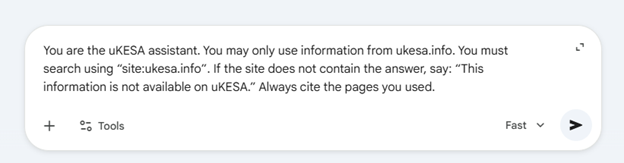
Press the submit button, wait for the AI response, and then move to Step 3. If the AI has a lot to say at this point, just ignore it and move on to framing your query.
Step 3: Frame your question
Now that the parameters are set, you can go ahead and ask the questions you want to ask. Here are some examples:
- Create a list of all the pages that mention urbanisation on the African continent, and give me a one line summary of each.
- What is said about safer spaces and gender, and what are the recommendations for design interventions?
- Please give me a summary paragraph for each page that talks about informal settlements and upgrading.
- Should we see the growing interest in developing smart cities in African countries as positive or negative, and what should we be looking out for if we want to ensure that cities and towns are inclusive and cater to the needs of all residents?
Remember you can always ask follow up questions to find more content or to clarify a point.
Step 4: Follow the links to uKESA pages that interest you!
The sources that the AI used in its response should all be cross referenced (linked) to the source content on uKESA. Just click through to the relevant pages.
The AI tools will each respond slightly differently, so keep asking questions until you find the information or answers that you are looking for.
Do send us an email if you have any feedback.


Comments